
Cookie Testing

Browser cookie illustration

Cookie is a small record that the browser stores for a site and can send back to the server in HTTP requests.

They help “remember” the user: keep authorization active, store settings, interface language, cart contents, and other information between requests.
The server can send a cookie to the browser using the Set-Cookie header. After that, the browser stores the cookie and automatically adds it to subsequent requests when the request matches the cookie settings: domain, path, and other attributes.

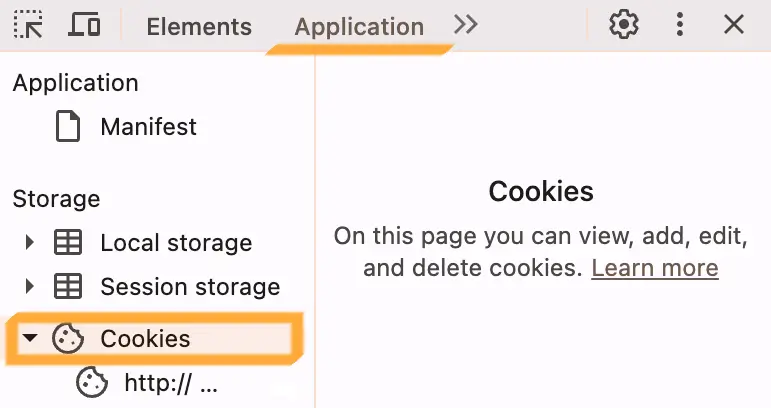
  1. Open DevTools:
    • Windows/Linux — F12 or Ctrl + Shift + I
    • macOS — F12 or Cmd + Option + I
  2. Go to the Application
  3. In the left menu, open Cookies and select the current site
DevTools Application tab with cookies

Close the hint: the page writes this to a cookie and will not show the hint after reload.

Try it

Delete the cookie with the button above and reload the page: the hint will appear again.

Cookies, localStorage, and sessionStorage all store data in the browser, but they are used for different tasks.

Task
Task available to premium users!

Unlock access to learn without limits.

Full access to all practical tasks
Answer checking
Unlimited attempts
Sidebar arrow