SQL Query Language

Structured Query Language

Sooner or later, we all run into the need to «dig into» a database. For that, it’s worth learning how to write at least simple queries using SQL — a language for working with data in relational databases.

Some operations can be done using graphical tools provided by database management systems (DBMS), but SQL gives you more possibilities.
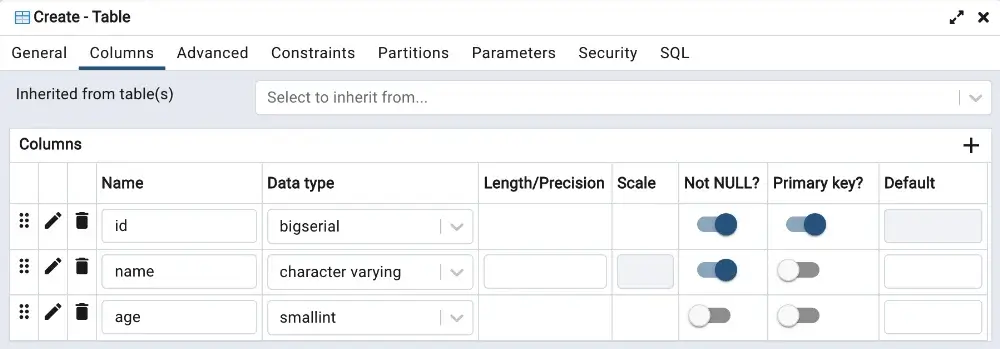
create-table-pgadmin
Creating a table using the graphical interface of pgAdmin for working with the PostgreSQL DBMS PostgreSQL

SQL Commands

There are 5 types of SQL commands for working with relational databases.

Type Command Description
1. Data Definition DDL
(Data Definition Language)
CREATE
ALTER
DROP
Create a table
Alter a table
Drop a table
2. Data Manipulation DML
(Data Manipulation Language)
INSERT
UPDATE
DELETE
Insert data into a table
Update data in a table
Delete data from a table
3. Data Querying DQL
(Data Query Language)
SELECT Select data from a table
4. Access Control to data DCL
(Data Control Language)
GRANT
REVOKE
Grant a user access to a table
Revoke a user’s access to a table
5. Transaction Control TCL
(Transaction Control Language)
COMMIT
ROLLBACK
Commit changes
Roll back changes

We’ll cover each of these types — DDL, DML, and DQL — with examples and practice later. For now, let’s look at the general syntax rules of SQL.

Rules for Writing SQL Queries

Follow the order of keywords when writing SQL queries

Don’t use reserved words as names for tables, columns, etc.

Aa

SQL commands are NOT case-sensitive, SELECT = select

Keep the database dialect in mind — the syntax may differ slightly

;

Use a semicolon at the end of each query — it’s critical for some databases

Double hyphen -- lets you leave comments in code

Example of a query for creating the «cat» table. Reserved words are shown in bold:


    CREATE TABLE cat (            -- creating the «cat» table
        id SERIAL PRIMARY KEY,    -- creating the «id» column with automatic numeric ID generation (SERIAL)
        name VARCHAR(64),         -- creating the «name» column with type VARCHAR (string) and a maximum length of 64 characters
        age INTEGER               -- creating the «age» column with numeric type INTEGER
    );

Task
Task available to premium users!
Sidebar arrow