CREATE, ALTER, DROP commands
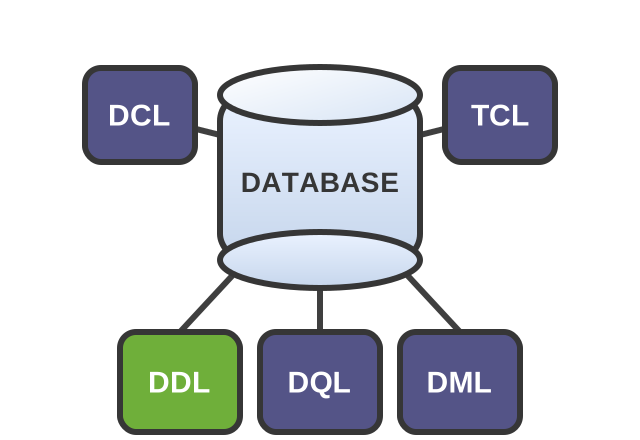
CREATE
Create an object
With the CREATE command, you can create a table, an index, and even a new database.
To create a new table, specify the keyword phrase CREATE TABLE and the table name, then list the column names, their data types, and constraints if needed.
CREATE TABLE table_name (
    column_name1 data_type1 [constraints],
    column_name2 data_type2 [constraints],
    ...
    column_nameN data_typeN [constraints]
);
As an example, let’s create a table named cat.
CREATE TABLE cat (               -- create the «cat» table
    id SERIAL PRIMARY KEY,       -- create the «id» column with automatic numeric ID generation (SERIAL)
    name VARCHAR(64) NOT NULL    -- create the «name» column with the VARCHAR (string) type and a maximum length of 64 characters
);
As a result, we get an empty table cat
| id | name |
|---|---|
Syntax and data type names may vary slightly depending on the DBMS. The examples use the Postgres dialect — PostgreSQL.
ALTER
Modify an object
The ALTER command is used to change the structure of objects that were previously created in the database.
ALTER with ADD
After creating the table, we decided to add a new column.
For example, let’s add the age column to the cat, table. We’ll use ALTER with ADD.
ALTER TABLE cat     -- alter the «cat» table
ADD age INTEGER;    -- add the «age» column with the INTEGER (whole number) type
Table cat
| id | name | age |
|---|---|---|
ALTER with DROP
To remove something, use ALTER with DROP.
For example, let’s drop the age column from the table cat.
ALTER TABLE cat     -- alter the «cat» table
DROP COLUMN age;    -- drop the «age» column
Table cat
| id | name | age |
|---|---|---|
ALTER with MODIFY
To change something — for example, to change the data type of an existing column name — use ALTER with MODIFY.
ALTER TABLE cat              -- alter the «cat» table
MODIFY name VARCHAR(128);    -- change the «name» column type to VARCHAR (string) with a maximum length of 128 characters
DROP
Delete an object
DROP, already familiar to us from the ALTER with DROP command, lets you delete objects in a database.
Specify the keyword DROP, the object type (TABLE, DATABASE, COLUMN, and others), and its name.
DROP object_type object_name;For example, let’s drop the table cat.
DROP TABLE cat; -- drop the «cat» tableCreate the table candy.
Choose column names and data types according to the table schema:
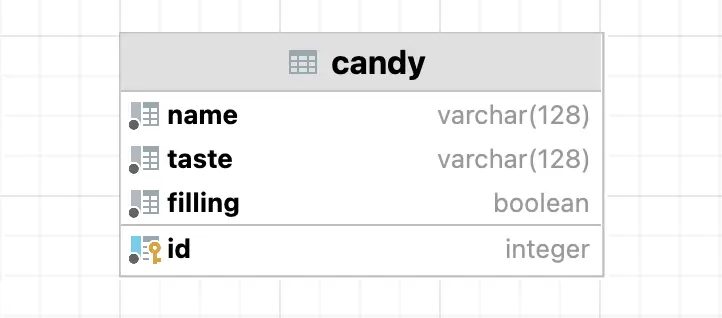
Table and column names are case-sensitive.
Level up!