How to Write Scripts in Postman

Script developer cat

A script is a set of commands that helps automate routine, repetitive actions. For example, automatically inserting an access token into requests that require authorization.

Scripts can be used to automate test scenarios. Scripts can be written in different programming languages, one of which is JavaScript.

JavaScript Basics for Writing Scripts

Let’s briefly go through the basics of writing code in JavaScript.

1. Variables

A variable is a container for storing information. The keyword var is used to declare a variable.

What we store Type Code example
Name string
var name = "Astronaut cat";
Age number
var age = 4;
Ready for launch boolean
var isReadyForLaunch = true;
List of items for the flight array
var inventory = ["helmet", "gloves", "rations"];

2. Functions

Functions are created using the keyword function.

Let’s assume we have two functions: one prepares the ship for launch, the other calculates the fuel reserve.

A function that prepares the ship for launch
function prepareShip(name) {
    return "The ship «" + name + "» is ready for launch!";
}
A function that calculates fuel based on distance
function calculateFuel(distance) {
    return distance * 42;
}

3. Calling Functions

Functions are called by name and can accept arguments. Let’s see how this looks in code.

What we do Call example
Prepare the ship for launch
prepareShip("Voskhod-3");
Calculate fuel
var fuel = calculateFuel(800);
Output a message to the console
console.log("Launch has started!");

Properties and Methods of the pm Object in Postman

Postman provides an execution environment where you can write JavaScript scripts — the so-called “Postman Sandbox”. You can write code in the section Scripts.

You can call Postman’s special functions by accessing the methods and properties of the object named pm.

1. pm.environment

Using the pm object, you can access the environment property and dynamically get and set environment variables.

Accessing the environment object and calling the get function allows you to get the value of an environment variable by passing the variable name as a parameter.
pm.environment.get("variableName")
Accessing the environment object and calling the set function allows you to set the value of an environment variable by passing the variable name and value.
pm.environment.set("variableName", "variableValue")

2. pm.globals

Using the pm object, you can access the globals property and work dynamically with global variables (available across all environments).

Accessing the globals object and calling the get function allows you to get the value of a global variable by passing the variable name as a parameter.
pm.globals.get("variableName")
Accessing the globals object and calling the set function allows you to set the value of a global variable by passing the variable name and value.
pm.globals.set("variableName", "variableValue")

3. pm.test

Using the pm object, you can call the test method to write your own test.

Calling the test method with two parameters — the test name and a validation function. If the function runs without errors, the test passes; otherwise, it fails.
pm.test("Let's check if code is 200",
    function () {
        pm.response.to.have.status(200);
    }
);

Pre-request Scripts in Postman

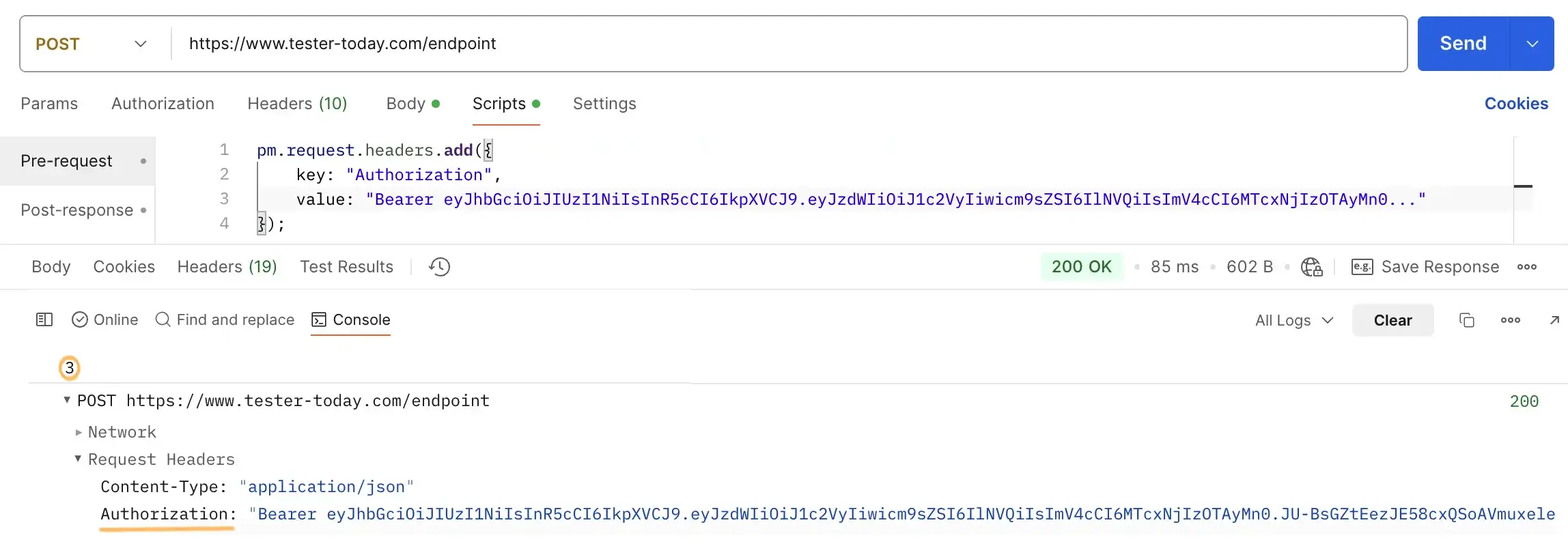
Scripts defined in the Scripts —> Pre-request section are executed before a request is sent. This can be any JavaScript code, but the key object whose properties are available in the Pre-request section is request. You can access it via pm.request. When you type a dot, a dropdown list of all available methods appears.

Postman pre-request script example
Example of a script in the Pre-request section in Postman
Accessing the request (request) object, then the headers property and calling the add method to add headers.
pm.request.headers.add({
    key: "Authorization",
    value: "Bearer jwt"
});

Post-response (Tests) Scripts in Postman

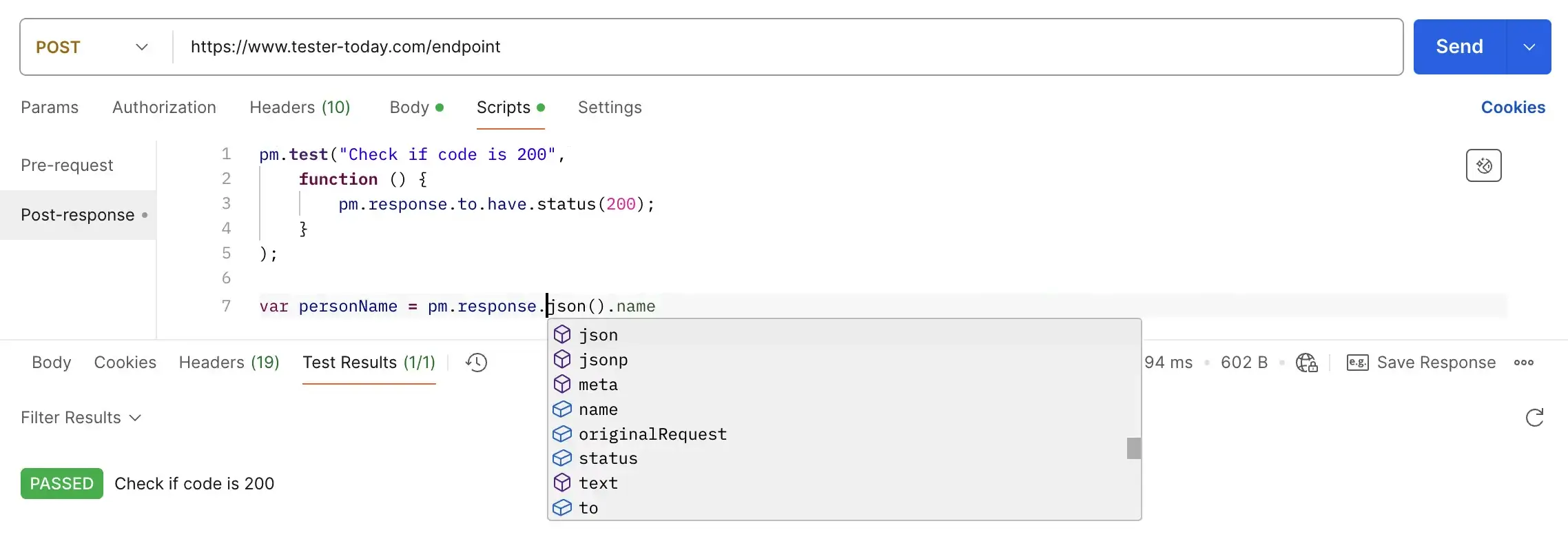
Scripts defined in the Scripts —> Post-response (Tests) section are executed after a request has been sent and a response has been received from the server. In addition to accessing the request, you now have access to the response object. You can access it via pm.response. After typing a dot, a list of all available methods is displayed.

It is in Post-response that automated checks are most commonly written to ensure the server response meets expectations. To write a test, call pm.test and pass in any test name and a function that will be executed after the request is sent. The result of the function will set the test status to true = PASSED or false = FAILED and will be displayed in the Test Results.

Postman post-response test example
Example of a script in the Tests section in Postman
Accessing the response (response) object, then the code property returns the HTTP status code of the response.
pm.response.code
Accessing the response (response) object and calling the json() function converts the response body to JSON or throws an error if it cannot be converted.
pm.response.json()

Why Write Scripts in Postman

To sum up, scripts in Postman allow you to automate part of your work — generate test data, prepare requests, and write automated checks for server responses.

Postman’s capabilities for writing full-scale automated tests are limited, but they are sufficient for basic API testing. For comprehensive automated test scenarios, you will need to learn a programming language such as Java or Python and explore testing frameworks and tools like Selenium, Playwright, Rest Assured.

Task
Task available to premium users!
Sidebar arrow