Accessibility Testing

Accessible website

Online content should be accessible to a wide range of users, including people with disabilities.

WCAG Standard (Web Content Accessibility Guidelines) defines guidelines to create a web environment usable by most people, regardless of their physical abilities.

Let's go through the WCAG recommendations for content.
Perceivable

Information and user interface elements should be easy to perceive.

All non-text content should have a text description

Color contrast ratio should be at least 4.5:1

Example of high-contrast text.

Content should be adaptive and change without losing information or structure

Try resizing the window or rotating your device; the blocks will adjust.

Learn more about responsive design

Text can be resized up to 200% without assistive technologies without losing content

Try increasing text size using the keyboard:

  • Windows/Linux — Ctrl + +
  • macOS — Cmd + +

Line spacing should be at least 1.5 times the font size

This text has insufficient line spacing.
Continued text on a new line.

Paragraph spacing should be at least double the font size

First paragraph.

Second paragraph. This text has increased spacing between paragraphs.

Letter spacing should be at least 0.12 times the font size

Example of text with increased letter spacing.

Word spacing should be at least 0.16 times the font size

Example of text with increased word spacing.

Devtools accessibility

Using DevTools -> Elements select any element on the page.

In the Styles section you can see the element's CSS styles: font, color, etc.

Hover over an element and look at the ACCESSIBILITY section in the popup. The Contrast field shows the element’s current contrast ratio and a warning if the contrast is insufficient.

Determine the contrast ratio of the «Send» button using DevTools

Operable

The user interface should be easy to use.

Keyboard Accessibility

All functionality should be accessible via keyboard.

Enough Time

Users should have enough time to read and interact with content.

Safe to Perceive

Content should not negatively affect the user’s physical well-being.

Easy Navigation

Users should have convenient ways to navigate and find content.

Keyboard Navigation Keys

Try navigating the page using your keyboard.

Understandable

Information and UI functionality should be clear.

  • Content should be clear.
  • Content should behave and display predictably.
  • Informative messages should help users avoid errors in forms.

Robust

Content should support a wide range of devices and assistive technologies:

Screen readers and magnifiers

Keyboard control

Voice control

Alternative input devices

Accessibility Testing Tools

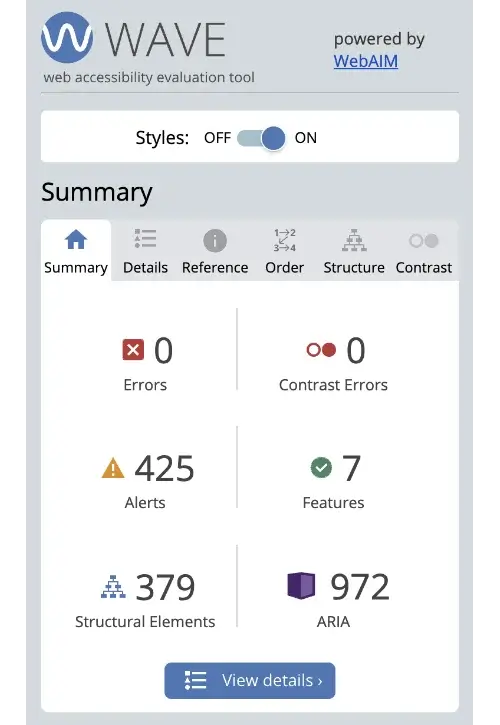
As a browser extension extension for Chrome and online in the browser you can use the tool to check content accessibility WAVE Evaluation Tool.

WAVE follows the WCAG standard and allows automating many checks. Bonus: WAVE includes color contrast checking features.

WAVE Evaluation Tool

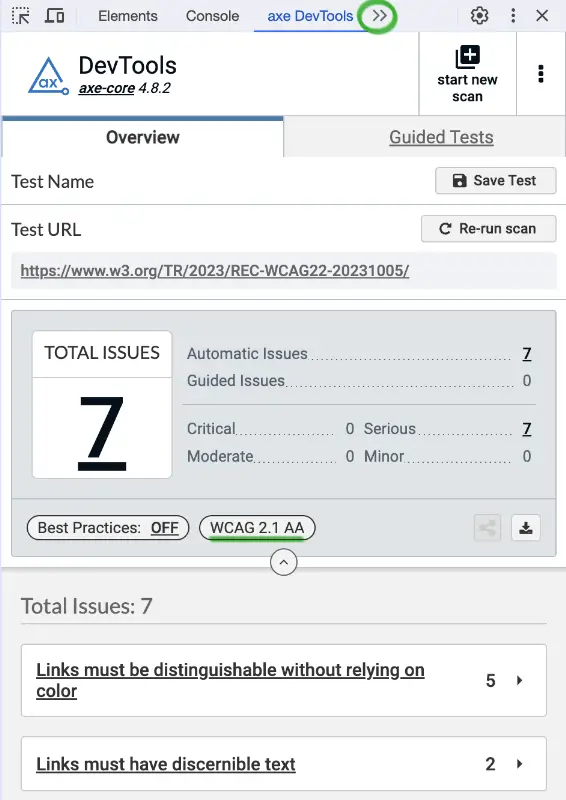
Also available as a browser extension you can try axe DevTools, also based on the standard WCAG. To use it after installation:

  1. Open DevTools
  2. Select from the dropdown >> axe DevTools
  3. Click Scan ALL of my page

axe DevTools

Task
Task available to premium users!
Sidebar arrow